What Gaming PC to Buy: 2026 Practical Buyer’s Guide
Choosing a gaming PC isn’t just about the latest GPU name or headline CPU. It’s about matching the right hardware to the games you play, the resolution and frame rate you want, and your upgrade tolerance and budget. This guide walks you through how to decide what gaming PC to buy in 2026 and ends with tested recommendations that fit common needs.
How to choose a gaming PC
Answer these four quick questions first — they’ll narrow your options fast:
- What games do you play most (competitive FPS, open-world single-player, simulation)?
- What resolution and frame rate do you want (1080p60, 1440p144, 4K60)?
- Do you prefer a desktop or a laptop—and do you need portability?
- How important is future upgradeability?
Match games to GPU power
Competitive multiplayer (Valorant, CS2) favors high frame rates and lower GPU demands, so a midrange GPU with high refresh monitor works best. Open-world or ray-traced titles require more GPU headroom. Use your target resolution and frame rate to gauge the GPU class you need.
Don’t overlook CPU and memory for modern titles
Modern games and streaming can lean heavily on CPU cores and fast memory. If you plan to stream or run CPU-heavy tasks (content creation, large mods), choose a stronger CPU and at least 16–32GB of fast RAM.
Budget tiers and who they suit
Below are practical tiers with common uses so you can pick the right category.
Entry / Budget (Casual gaming, 1080p)
- Target: 1080p gaming at 60–100 fps on medium to high settings.
- Typical components: entry to lower-mid GPU, quad/hexacore CPU, 16GB RAM, 512GB–1TB SSD.
- Best for: esports titles, older AAA games, light AAA at medium settings.
Midrange (Most gamers)
- Target: 1440p at 60–144 fps or 1080p high/ultra at very high fps.
- Typical components: mid-high GPU class, 6–12 core CPU, 16–32GB RAM, 1TB SSD.
- Best for: mainstream AAA titles, streaming at decent quality, future-proofing for 2–3 years.
High-end / Enthusiast
- Target: 4K60+ or ultrawide high-refresh gaming, maxed settings, heavy ray tracing.
- Typical components: top-tier GPU, 12+ core CPU, 32GB+ RAM, fast Gen4/Gen5 NVMe SSDs.
- Best for: demanding AAA, creators who game, and gamers who want maximum longevity.
Components breakdown (what actually matters)
GPU (Graphics card)
The most important component for gaming performance. Choose based on your target resolution and game settings.
CPU
Important for CPU-bound games and multitasking. Pick processors with good single-thread performance and enough cores for streaming and background tasks.
Memory (RAM)
16GB is the realistic minimum today; 32GB is recommended if you stream, do content creation, or multitask heavily.
Storage
NVMe SSDs dramatically reduce load times. Aim for at least 1TB if you keep several large AAA titles installed.
Cooling and PSU
Reliable cooling keeps performance consistent. A quality power supply with some headroom is essential for long-term stability.
Affiliate disclosure & recommendations
Affiliate disclosure: This article contains affiliate links. If you buy through these links I may earn a small commission at no extra cost to you. Links are listed with full rel attributes.
Top picks by use case (click product names to view specs and buy)
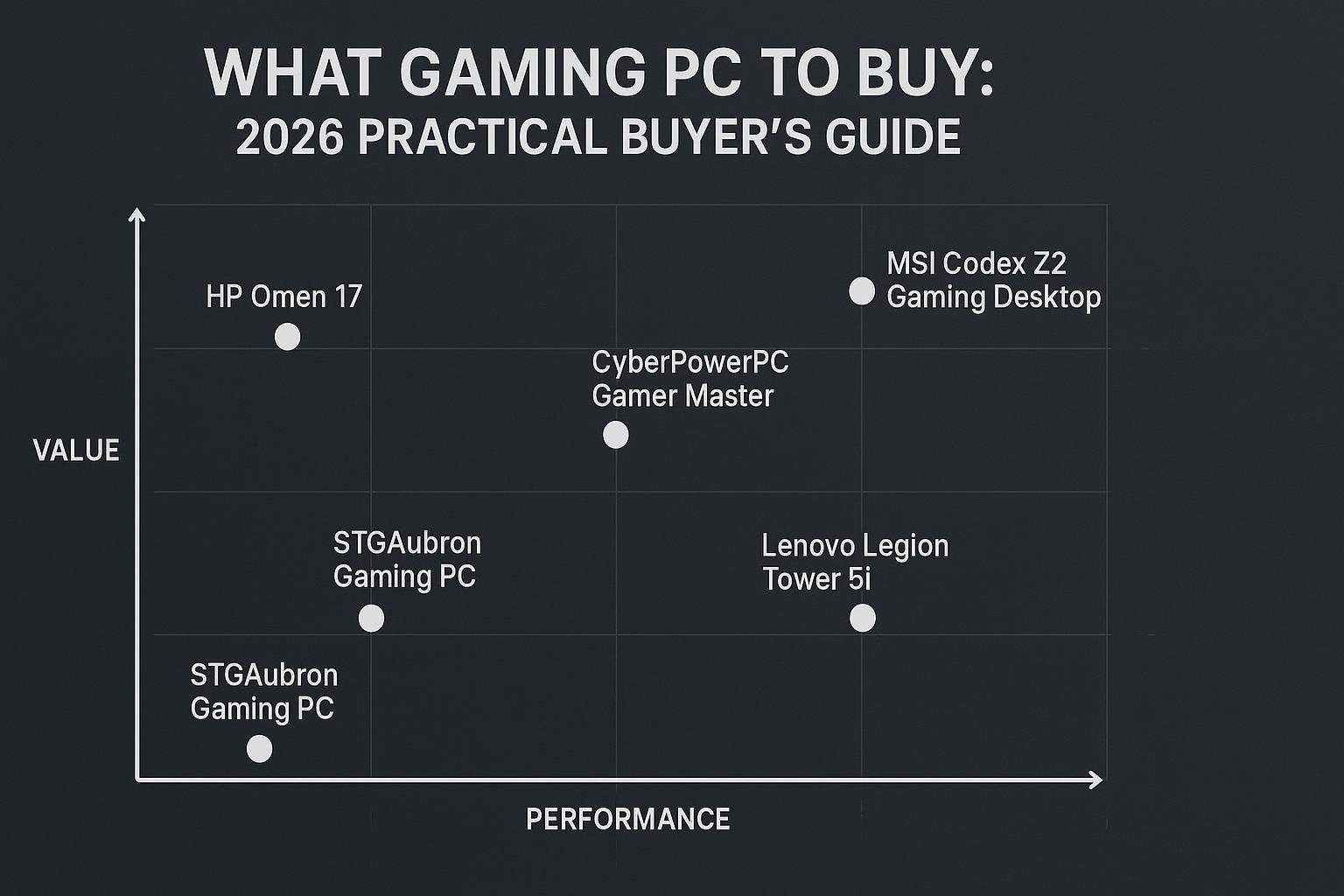
- Best all-around high-value desktop: msi Codex Z2 Gaming Desktop: AMD R7-8700F, GeForce RTX 5070, 32GB DDR5, 2TB m.2 NVMe SSD — great for 1440p high-refresh and solid 4K results in many titles.
- Best midrange gaming PC: CyberPowerPC Gamer Master Gaming PC, AMD Ryzen 7 8700F, GeForce RTX 5060 Ti, 16GB DDR5, 1TB PCIe 4.0 SSD — balanced for 1440p and high-FPS 1080p play.
- Best gaming laptop (portable power): HP OMEN 17.3 RTX 5070 AI Gaming Laptop, AMD Ryzen AI 9 365, 32GB DDR5, 1TB SSD — for gamers who need mobility without major compromises.
- Value desktop option: STGAubron Gaming PC: Intel Core i7, Radeon RX 580 8G, 16GB RAM, 512GB SSD — budget-friendly, suitable for 1080p play and older titles.
- Top-tier enthusiast machine: Cooler Master TD5 Pro: AMD RYZEN 7 9800X3D, NVIDIA GeForce RTX 5090, 32GB DDR5, 2TB Gen4 M.2 — for high-end 4K, ray tracing, and content creation workloads.
How I chose these picks
- Each option balances CPU, GPU, RAM, and SSD to match the described use case.
- I prioritized systems that list key specs clearly: CPU model, GPU model, RAM size and type, and SSD capacity.
- For laptops I focused on machines with large displays and high memory for portability and multitasking.
Comparison table
Quick spec view to compare the recommended systems. Prices change often—click the product link for current pricing and details.
| Model | Best for | CPU | GPU | RAM | SSD | Link |
|---|---|---|---|---|---|---|
| msi Codex Z2 | High-value desktop | AMD R7-8700F | GeForce RTX 5070 | 32GB DDR5 | 2TB m.2 NVMe | Buy on Amazon |
| CyberPowerPC Gamer Master | Midrange gaming | AMD Ryzen 7 8700F | GeForce RTX 5060 Ti | 16GB DDR5 | 1TB PCIe 4.0 SSD | Buy on Amazon |
| HP OMEN 17.3 | Portable high-performance | AMD Ryzen AI 9 365 | RTX 5070 | 32GB DDR5 | 1TB SSD | Buy on Amazon |
| STGAubron (RX 580) | Budget desktop | Intel Core i7 (up to 3.9GHz) | Radeon RX 580 8G | 16G RAM | 512G SSD | Buy on Amazon |
| Cooler Master TD5 Pro | Enthusiast | AMD RYZEN 7 9800X3D | NVIDIA GeForce RTX 5090 | 32GB DDR5 | 2TB Gen4 M.2 | Buy on Amazon |
Build vs buy: quick decision checklist
When to buy a prebuilt
- You want a working system out of the box with warranty and support.
- You prefer convenience over tinkering and troubleshooting.
- You want a tested cooling solution and a clean cable-managed system.
When to build your own
- You want the best value for parts and enjoy picking each component.
- You need very specific component choices or custom cooling.
- You’re comfortable troubleshooting and installing OS and drivers.
Quick buying checklist
- Match GPU to target resolution and fps.
- Confirm RAM is at least 16GB; prefer 32GB if you multitask or stream.
- Choose NVMe SSD for OS and games; 1TB+ recommended for many gamers.
- Check the warranty and upgrade options before purchase.
Frequently Asked Questions (FAQs)
1. What gaming PC should I buy for 1080p 144Hz?
For 1080p144 you don’t need the absolute top GPU. Midrange GPUs paired with a strong CPU and 16–32GB RAM will give you consistent high frame rates. The CyberPowerPC Gamer Master is a balanced option targeting high refresh play.
2. Is a gaming laptop as good as a desktop?
Modern gaming laptops like the HP OMEN 17.3 can offer desktop-level performance but with thermal and power limits. Laptops are the choice for portability; desktops still lead in upgrade potential and long-term raw performance per dollar.
3. How much RAM do I need for modern gaming?
16GB is the practical minimum. If you stream, run content creation apps, or keep many background apps open, 32GB is recommended.
4. Should I prioritize CPU or GPU?
For gaming the GPU is typically the top priority, but certain multiplayer and CPU-bound titles need a strong CPU. Aim for a balanced system based on your most-played games.
5. Are prebuilt warranties reliable?
Prebuilt systems usually come with manufacturer warranties that cover hardware failures. Read the warranty terms (parts, labor, return shipping) and check whether the vendor offers on-site or carry-in support.
6. How often should I upgrade?
Upgrading every 3–5 years is common for gamers who want to maintain high settings. If you buy higher-tier hardware today you can stretch that interval further.
Conclusion
Deciding what gaming PC to buy boils down to matching your target resolution and frame rate with the right GPU, pairing it with a capable CPU, and ensuring enough RAM and fast storage. Prebuilt systems are ideal for convenience and warranty support; building offers customization and potential savings. Use the product recommendations above to fit your needs: the msi Codex Z2 and CyberPowerPC Gamer Master are solid desktop choices, the HP OMEN 17.3 covers portable high-performance, and options like the Cooler Master TD5 Pro serve enthusiasts who want top-end performance.
Need help narrowing choices further based on a specific game, monitor, or budget? Tell me the games you play and your target monitor resolution and I’ll recommend the best match.
Further reading: general hardware buying advice and reviews can be found on trusted tech sites such as Tom’s Hardware and PC Gamer.
Visual Buying Guide