What Do Gaming PC Need? Complete Checklist for Buyers and Builders
Building or buying a gaming PC raises the same question: what do gaming PC need to run modern games smoothly and reliably? This guide breaks down the essential parts, explains realistic performance trade-offs, and recommends prebuilt systems at multiple price points. Follow this checklist to avoid common mistakes and get the best value for your budget.
Gaming PC basics: the core components
Every gaming PC needs a handful of core components. Each plays a distinct role in performance and user experience:
- CPU (Processor) — Handles game logic, physics, AI, and background tasks.
- GPU (Graphics Card) — Renders frames and determines visual fidelity and framerate.
- RAM — Temporary workspace for the OS and games; affects smoothness and multitasking.
- Storage — Fast drives reduce load times and improve streaming of in-game assets.
- PSU (Power Supply) — Provides stable power; quality matters for reliability and upgradability.
- Cooling & Case — Keeps components at safe temperatures and can impact noise.
- Motherboard — Connects everything; determines expansion and feature set.
- Display, Input & Network — Monitor, keyboard, mouse, and reliable internet complete the setup.
Key performance metrics
When choosing parts, focus on metrics that affect real-world gaming:
- FPS (Frames Per Second) — Determines smoothness; target depends on monitor refresh rate.
- Resolution and quality settings — 1080p, 1440p, 4K — higher resolution needs more GPU power.
- Latency & input lag — Important for competitive play and responsiveness.
- Loading times — Improved dramatically by NVMe SSDs vs older HDDs.
- Thermals & sustained performance — Thermal throttling reduces long-session performance.
Component checklist: what each part needs to deliver
CPU: how powerful should it be?
Choose a CPU based on gaming target and streaming needs:
- For 1080p gaming at 60–144Hz: a modern 6-8 core CPU (desktop) or equivalent laptop CPU is sufficient.
- For 1440p or higher or streaming/recording while gaming: prefer 8+ cores and higher single-core clocks.
- Look for CPUs with strong single-thread performance and enough cores for background tasks.
GPU: the most important gaming component
The GPU is the primary determinant of frame rates and visual settings. Match GPU capability to your monitor:
- 1080p competitive gaming: mid-range GPUs provide high FPS at lower latency.
- 1440p high settings: upper-mid to high-end GPUs.
- 4K or ultra settings with ray tracing: high-end GPUs (and expect to tune ray tracing settings).
RAM: capacity and speed
RAM is simple but important:
- Minimum: 16GB for modern gaming and background apps.
- Recommended: 32GB if you stream, run many apps, or use demanding mods.
- Speed: DDR5 or DDR4 depending on platform. Faster RAM can help CPU-limited scenarios.
Storage: NVMe vs SATA
NVMe M.2 SSDs deliver the fastest game load and asset streaming. Typical guidance:
- Primary drive: 500GB–1TB NVMe SSD for OS and current games.
- Secondary: larger SATA SSD or HDD (2TB+) for bulk libraries and backups.
Power supply (PSU)
- Choose a reputable PSU with adequate wattage and an 80 Plus efficiency rating.
- Allow headroom for upgrades: don’t run a PSU at its maximum continuously.
Cooling and case
Good airflow and a decent cooler (air or AIO) prevent thermal throttling. Consider case size for GPU length and cooling options.
Peripherals, display and networking
Monitor
- Match your monitor’s resolution and refresh rate to the GPU — no point buying a 240Hz monitor if the GPU struggles to reach those FPS at your resolution.
- G-Sync or FreeSync can reduce stutter; choose based on GPU brand and monitor support.
Keyboard, mouse, headset
Choose durable and comfortable peripherals. Mechanical keyboards and gaming mice with high polling rates improve responsiveness.
Networking
For online gaming, prioritize wired Ethernet for lowest latency. If wireless is needed, Wi-Fi 6 or better reduces congestion; a solid router matters.
Product recommendations (prebuilt systems)
Affiliate disclosure: Some links below are affiliate links. If you buy through these links I may earn a commission at no extra cost to you.
Below are recommended prebuilt systems across different budgets and use cases. Each product name links to the listed affiliate URL.
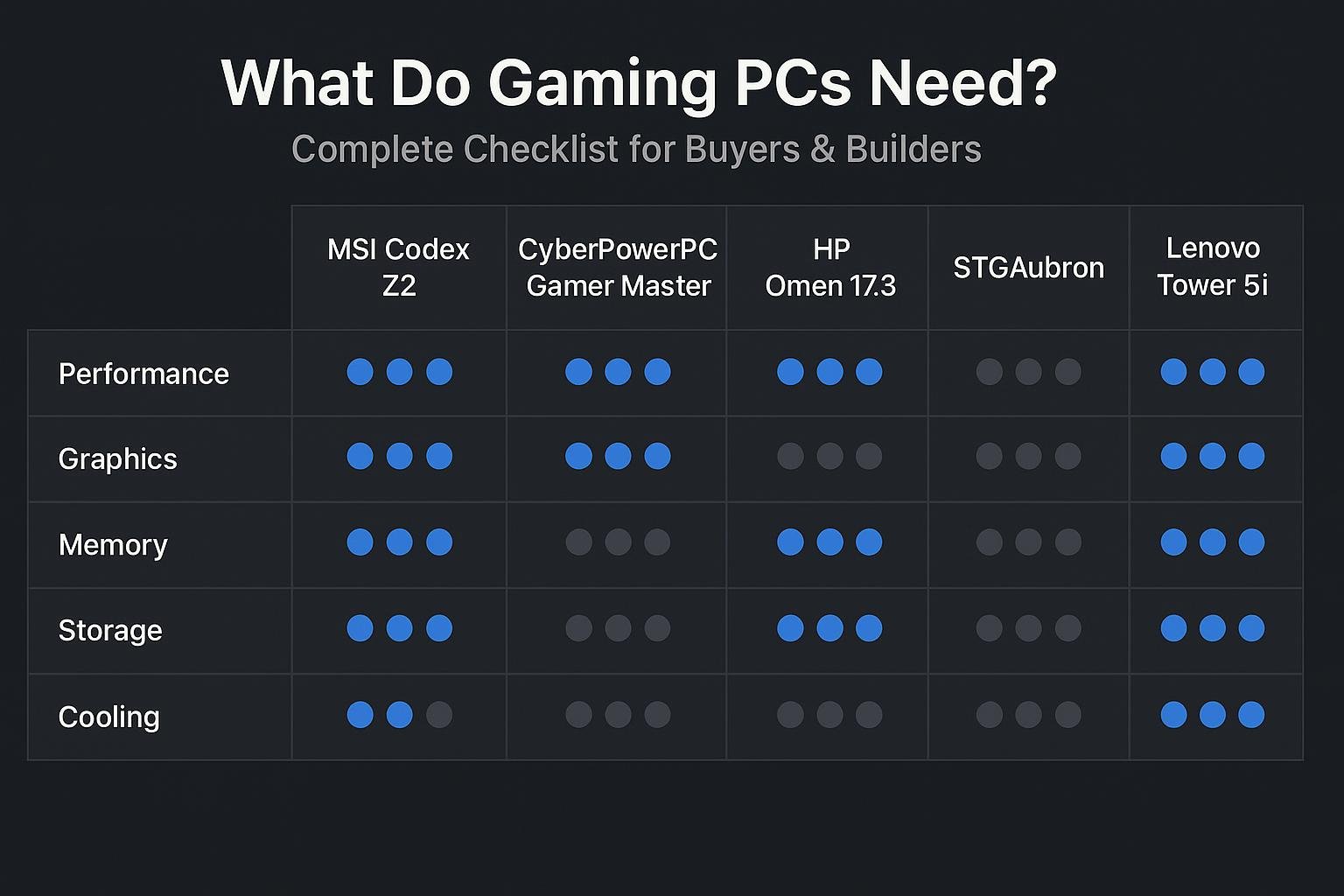
- MSI Codex Z2 Gaming Desktop: AMD R7-8700F, GeForce RTX 5070, 32GB DDR5, 2TB M.2 NVMe SSD, USB Type-C, VR-Ready, Windows 11 Home — A strong balance between CPU and a modern GPU for 1440p gaming and streaming.
- CyberPowerPC Gamer Master Gaming PC, AMD Ryzen 7 8700F, GeForce RTX 5060 Ti, 16GB DDR5, 1TB PCIe 4.0 SSD — Good mid-high range option for high-framerate 1080p and 1440p play.
- HP OMEN 17.3 RTX 5070 AI Gaming Laptop, 17.3″ FHD 144Hz, AMD Ryzen AI 9 365, 32GB DDR5, 1TB SSD — Portable option with desktop-class GPU performance in a laptop form factor.
- Lenovo Legion Tower 5i Gen 10 Gaming Desktop 2026, Intel Ultra 7 265F, NVIDIA GeForce RTX 5070, 32GB DDR5, 2TB PCIe SSD — High core-count CPU and strong GPU for future-proofing.
- Cooler Master TD5 Pro Gaming PC – AMD RYZEN 7 9800X3D, NVIDIA GeForce RTX 5090 32GB, 32GB DDR5 — Top-tier enthusiast option for ultra settings and 4K gaming.
- STGAubron Gaming PC, AMD Ryzen 7 5700X, GeForce RTX 3050, 16GB DDR4, 1TB SSD — Budget-conscious build for solid 1080p gaming.
Quick comparison table
| Model | Best for | Key specs | Buy |
|---|---|---|---|
| MSI Codex Z2 | 1440p gaming & streaming | AMD R7-8700F, RTX 5070, 32GB DDR5, 2TB NVMe | Buy MSI Codex Z2 |
| CyberPowerPC Gamer Master | High-FPS 1080p/1440p | Ryzen 7 8700F, RTX 5060 Ti, 16GB DDR5, 1TB PCIe 4.0 | Buy CyberPowerPC |
| HP OMEN 17.3 (Laptop) | Portable high-refresh gaming | Ryzen AI 9 365, RTX 5070, 32GB DDR5, 1TB SSD | Buy HP OMEN 17.3 |
| Lenovo Legion Tower 5i | Future-proof desktop | Intel Ultra 7 265F, RTX 5070, 32GB DDR5, 2TB SSD | Buy Lenovo Legion |
| Cooler Master TD5 Pro | Enthusiast, 4K & ultra | Ryzen 7 9800X3D, RTX 5090, 32GB DDR5, 2TB Gen4 | Buy Cooler Master |
| STGAubron (Budget) | Entry-level 1080p | Ryzen 7 5700X, RTX 3050, 16GB DDR4, 1TB SSD | Buy STGAubron |
Practical build & buying tips
Match parts to your monitor
Decide target resolution and refresh rate first. A powerful GPU for 4K is wasted on a 60Hz 1080p monitor.
Balance CPU and GPU
For gaming, prioritize a stronger GPU over the highest-core-count CPU unless you also stream or do CPU-heavy tasks.
Get a quality PSU and good cooling
Cheap PSUs and poor cooling are common failure points. Spend a bit more for a trusted PSU brand and ensure adequate case airflow.
Consider future upgrades
Choose a motherboard and PSU that allow for a more powerful GPU or extra storage in the future.
Frequently Asked Questions
1. How much RAM does a gaming PC really need?
16GB is the current sweet spot for most gamers. Move to 32GB if you stream, run many background apps, or use heavy mods.
2. Is SSD necessary for gaming?
Yes. NVMe SSDs significantly reduce game load times and improve asset streaming compared to HDDs.
3. Do I need an expensive PSU?
Invest in a reliable PSU from a reputable brand. Efficiency ratings (80 Plus Bronze/Gold) and correct wattage headroom matter more than cost alone.
4. Can I game well on a laptop?
Absolutely. High-end gaming laptops like the HP OMEN 17.3 can match desktop performance for many games while offering portability.
5. What GPU should I buy for 1440p gaming?
For high settings at 1440p, aim for GPUs in the upper mid-range to high-end. Models listed in the recommendations such as systems with an RTX 5070 provide a good target.
6. How important is cooling and case airflow?
Very important. Good airflow keeps thermals down, prevents throttling, and reduces noise. Use a case with multiple intake and exhaust points.
Conclusion
In short, a gaming PC needs a balanced set of components: a capable GPU matched to your target resolution, a reasonably strong CPU, 16–32GB of RAM, NVMe storage for fast loads, a quality PSU, and adequate cooling. Choose peripherals and monitors that match your performance goals. If you prefer not to build, the recommended prebuilt systems above cover budget, mid-range, and enthusiast tiers and include options for desktop and laptop gamers.
Use the checklist in this guide to verify components before buying or building — and prioritize GPU, adequate cooling, and a reliable PSU for the best long-term experience.
Visual Buying Guide