Water Cooled Gaming PC: Guide to AIO & Custom Loops, Prebuilts, and Maintenance
If you want lower CPU/GPU temperatures, quieter operation, or more headroom for overclocking, a water cooled gaming PC can deliver. This guide walks you through why water cooling helps, AIO vs custom loops, installation and maintenance tips, and recommended prebuilt systems so you can decide whether a water cooled gaming PC is right for you.
Table of Contents
- Why choose a water cooled gaming PC?
- Types: AIO vs custom loop and setup basics
- How water cooling affects noise & performance
- Installation checklist
- Maintenance and typical intervals
- Product recommendations and comparison
- Conclusion & next steps
- FAQs
Why choose a water cooled gaming PC?
A water cooled gaming PC can reduce CPU and GPU temperatures compared with many air-cooled setups, which benefits sustained performance, overclocking stability, and acoustics. The thermal advantage comes from moving heat with liquid to a radiator where fans dissipate it more efficiently than a compact air heatsink. Beyond raw temperatures, water cooling often yields a cleaner look and can free up internal airflow pathways for other components.
Key benefits
- Lower sustained temps: Better heat transfer for heavy loads and long gaming sessions.
- Quieter operation: Larger radiators and slower fans can run quieter than small, high-RPM air coolers.
- Overclocking headroom: More stable thermals help maintain higher clocks under load.
- Aesthetics and space: Sleeker CPU blocks, tubing, and radiator options improve case visuals and internal airflow.
Tradeoffs and risks
- Cost: Water cooling—especially custom loops—costs more than comparable air solutions.
- Complexity: Installation and maintenance are more involved than air cooling.
- Leak risk: Although rare with quality parts and proper installation, leaks are a possible failure mode.
Types: AIO vs custom loop and setup basics
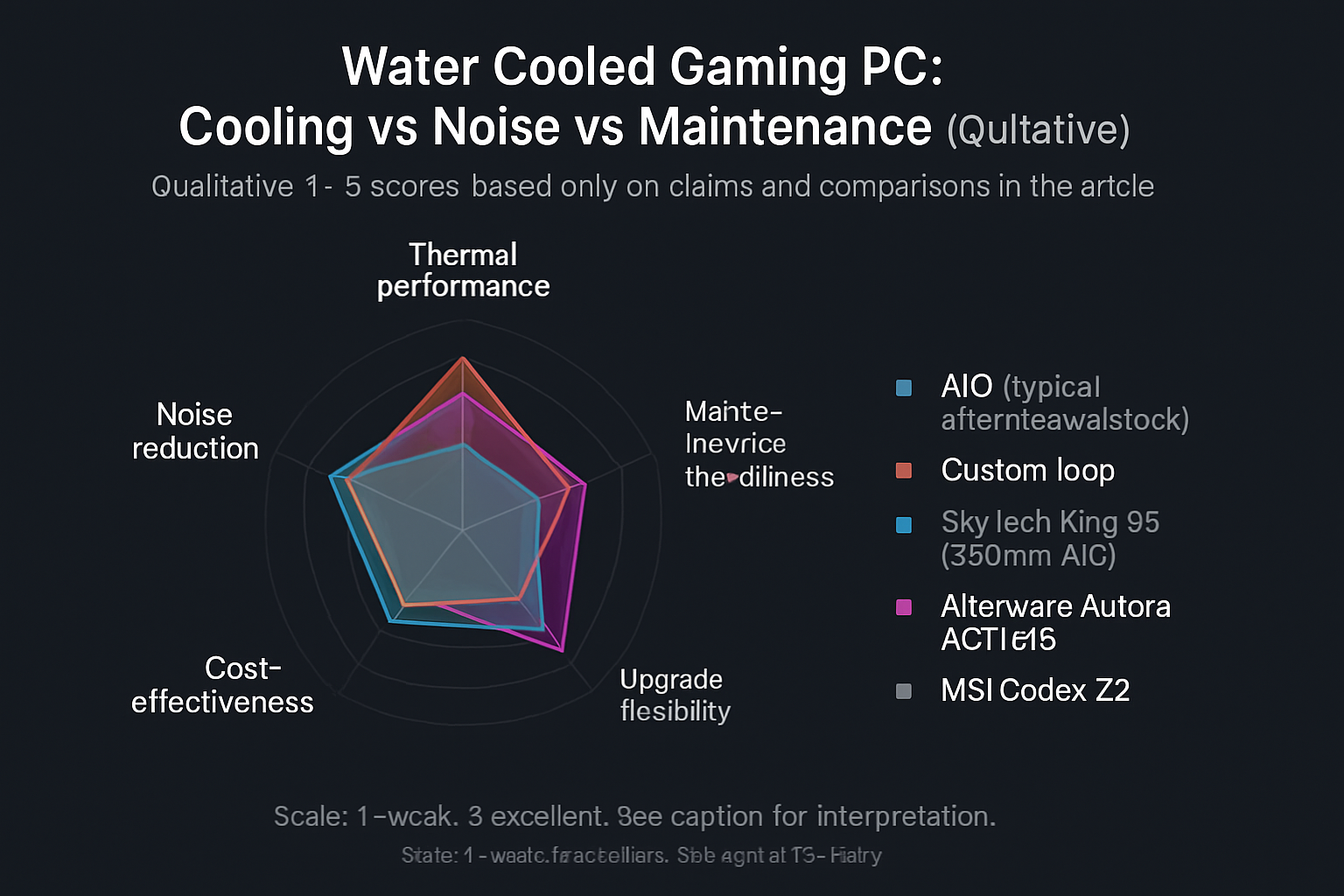
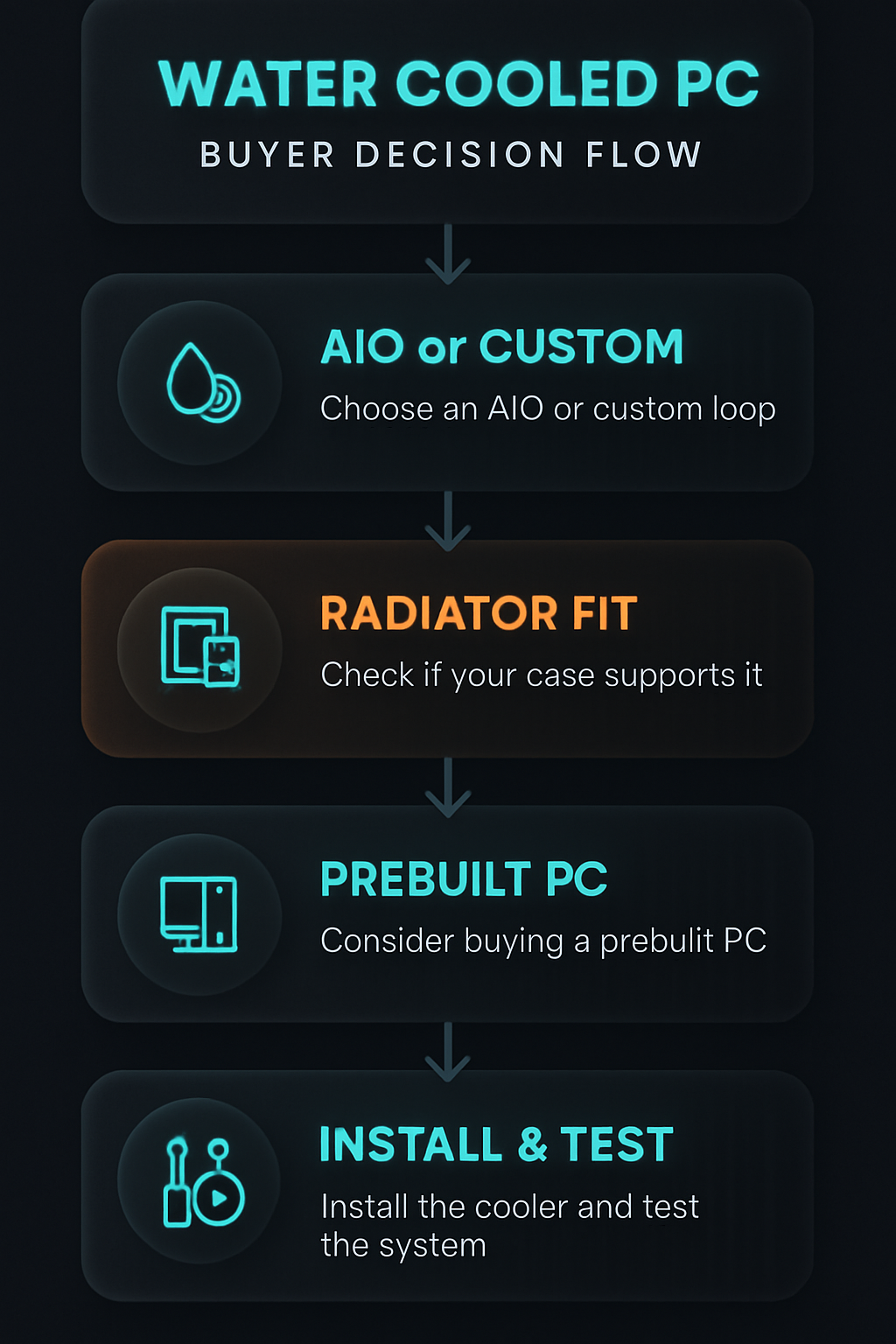
There are two main categories of liquid cooling for gamers: AIO (closed-loop) coolers and custom water-cooling loops. Both are valid for a water cooled gaming PC, but they suit different users.
AIO vs custom loop
- AIO (All-in-One / closed-loop):
- Pre-filled and mostly maintenance-free for months to years.
- Ease of installation similar to an air cooler: mount the pump/block to the CPU and install the radiator and fans.
- Great option for users upgrading a single component or who want water cooling without custom loop complexity.
- Custom loop:
- Fully modular system: separate pump, reservoir, radiators, tubing, blocks for CPU and GPU.
- Best thermal performance and visual customization, and allows cooling multiple components on one loop.
- Requires planning, more time to build, and regular maintenance (drain/fill, leak checks).
Who should choose which?
- Choose an AIO if you want improved thermals and quieter operation with minimal fuss—ideal for most gamers.
- Choose a custom loop if you want the best possible cooling, plan to cool both CPU and GPU together, or want extensive customization and are comfortable with maintenance.
How water cooling affects noise & performance
Water cooling can reduce noise because radiators move heat more efficiently; fans can run at lower speeds to achieve the same thermal goal. For many builds, this results in a quieter gaming environment. Performance-wise, a properly sized water cooling solution maintains lower component temperatures under sustained loads, which often translates to more stable boost clocks and less thermal throttling.
Noise considerations
- Fan quality, radiator size, and pump noise all matter; a larger 360mm radiator with quiet fans typically outperforms a small 120mm solution in both noise and cooling.
- Some pumps emit audible tones under load—choose reputable models and check reviews if silence is a top priority.
Installation checklist
Whether installing an AIO or preparing a prebuilt water cooled gaming PC, follow this checklist to reduce common issues:
- Read the manual for your cooler and case compatibility (radiator clearance and mounting points).
- Plan radiator placement (top, front, or rear) and ensure adequate airflow direction.
- Route tubing or cables to avoid kinks (for AIOs, keep radiator hoses unobstructed).
- Use a fan curve in BIOS or software to balance noise and temps.
- Test the system (power on) before closing your case—check for pump run and clear fans.
Quick installation tips
- Mount the radiator where fans can pull cool outside air when possible (front intake or top as exhaust depending on case airflow).
- Orient pump and tubing to avoid trapping air; on custom loops, include a high point reservoir for bleed-off.
- Keep spare fan and radiator screws handy—some cases don’t include the right lengths.
Maintenance and typical intervals
Maintenance depends on whether you have an AIO or a custom loop. Here are community best-practice intervals (not manufacturer-specific instructions):
- AIO: Visual check of fittings and hoses every 3–6 months; monitor temps and pump noise; most quality AIOs can run for several years without fluid changes, but lifespan depends on model and usage.
- Custom loop: Typical recommendations include flushing and replacing coolant every 6–18 months depending on coolant type and additives, checking fittings and clamps every 3 months, and inspecting for algae or discoloration during each change.
Simple maintenance checklist
- Monthly: Verify fans and pump are spinning and listen for unusual noises.
- Every 3–6 months: Inspect tubing/fittings for signs of moisture, discoloration, or seepage.
- Every 6–18 months (custom loop recommended): Drain, flush, and replace coolant; clean or replace tubing and check blocks.
Product recommendations
Affiliate disclosure: Some links below are affiliate links. If you buy through these links we may earn a small commission at no extra cost to you.
Below are a few prebuilt options and systems that include factory AIO water cooling (or are commonly sold in water-cooled configurations) to consider if you prefer a ready-made water cooled gaming PC experience. Use the linked product pages for full specs and options.
- MSI Codex Z2 Gaming Desktop (A8NVP-436US) — solid prebuilt platform (see product page for exact cooling configuration).
- Skytech Gaming King 95 Desktop (Ryzen 7 9800X3D, 360mm ARGB AIO) — includes a 360mm AIO for strong CPU cooling.
- Skytech Gaming King 95 Desktop (2TB Gen4, 360mm AIO) — another King 95 variant highlighting a 360mm AIO and fast storage.
- Alienware Aurora ACT1250 (RTX 5070) — a premium desktop line available with strong cooling options.
Comparison table
| Product | Key specs | Notes | Buy link |
|---|---|---|---|
| MSI Codex Z2 Gaming Desktop (A8NVP-436US) | A8NVP-436US | Good general-purpose prebuilt platform; check listing for cooling details. | MSI Codex Z2 Gaming Desktop |
| Skytech Gaming King 95 Desktop (Ryzen 7 9800X3D, 360mm ARGB AIO) | Ryzen 7 9800X3D, 360mm ARGB AIO | Factory-installed 360mm AIO provides strong CPU cooling and better sustained performance. | Skytech King 95 (360mm ARGB AIO) |
| Skytech Gaming King 95 Desktop (2TB Gen4, 360mm AIO) | 2TB Gen4, 360mm AIO | High-speed storage paired with a 360mm AIO for cooling and responsiveness. | Skytech King 95 (2TB Gen4, 360mm AIO) |
| Alienware Aurora ACT1250 (RTX 5070) | RTX 5070 | Premium desktop family; confirm specific cooling configuration on product page. | Alienware Aurora ACT1250 |
All the links above use affiliate URLs. Inspect each product page for the detailed configuration offered at the time of purchase—some SKUs vary by region and retailer.
Conclusion & next steps
A water cooled gaming PC—whether an AIO-equipped prebuilt or a custom loop—can deliver lower temperatures, quieter operation, and better stability under load. For most gamers who want improved cooling with minimal maintenance, an AIO-equipped prebuilt or AIO upgrade to your PC is the practical choice. Choose a custom loop if you want the absolute best thermal performance, distinctive looks, and don’t mind the additional complexity and upkeep.
Next steps:
- Decide if you want a prebuilt water cooled gaming PC or to retrofit/assemble one yourself.
- If you prefer simplicity, review the linked prebuilt options above and verify the exact cooling configuration on the retailer page.
- If you plan to build a custom loop, budget extra time and parts, and follow a conservative maintenance schedule.
FAQs
Is a water cooled gaming PC reliable?
Yes—when components are high quality and installed properly, water-cooled PCs are reliable. AIOs are pre-sealed and designed for long life; custom loops require more attention but are reliable when built with quality fittings and regular checks.
How often do I need to maintain a water cooling loop?
Community best practices: visually check fittings and pump every 3 months, and for custom loops plan on flushing and replacing coolant every 6–18 months depending on coolant and additives. AIOs typically need less frequent fluid attention but should be monitored for pump noise and leaks.
Does water cooling make my PC quieter?
Often yes. Because radiators provide a larger thermal surface, fans can run slower and quieter than small air coolers. Pump noise can be a factor—choose quality gear and set appropriate fan/pump curves.
Will a water cooled gaming PC improve FPS?
Water cooling doesn’t directly increase FPS, but by keeping CPU/GPU temperatures lower and reducing thermal throttling, it can improve sustained performance and maintain higher boost clocks during long gaming sessions.
Is a custom loop worth it compared to an AIO?
Custom loops offer better cooling potential and customization but require more money, time, and maintenance. For most gamers, a high-quality AIO offers an excellent balance of performance and simplicity.
Can I add a water block to my GPU later?
Yes—many GPUs have compatible GPU water blocks for custom loops. For prebuilt systems, confirm compatibility and warranty implications before modifying hardware.
Visual Buying Guide